Curriculum and Pedagogy
useR 2025
Curriculum
Curriculum guidelines
Use technology to explore concepts and analyze data. (GAISE, 2016)
Incorporate software/apps to explore concepts and work with data. (GAISE revision, in progress)
All programs should (a) expose students to technology tools for reproducibility, collaboration, database query, data acquisition, data curation, and data storage; (b) require students to develop fluency in at least one programming language used in data science and encourage learning a second language. (Two-Year College Data Science Summit, 2018)
The two pillars of computational and statistical thinking should not be taught separately…both should be present for the most effective and efficient teaching. (Curriculum Guidelines for Undergraduate Programs in Data Science, 2014)
Intro Data Science
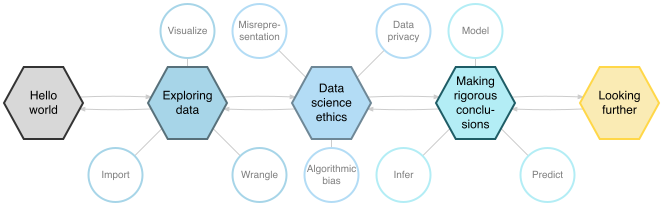
Image from Data Science in a Box
Intro Data Science topics
Unit 1: Exploring data
- Data visualization
- Exploring multivariable relationships
- Data wrangling
- Importing data
Unit 2: Making rigorous conclusions
- Relationships between multiple variables
- Predicting numeric and binary outcomes
- Model building and feature engineering
- Model evaluation and cross validation
- Simulation-based inference
Intro Data Science topics
Additional topics (varies by instructor)
- Interactive dashboards with Shiny
- Working productively with AI tools
- Text analysis
- Customizing Quarto reports and presentations
Computing throughout course
- Statistical analysis using R
- Reproducible reports using Quarto
- Version control and collaboration using git and GitHub
Computing as a learning objective
“The goal of teaching computing and information technologies is to remove obstacles to engagement with a problem.”
(Nolan & Temple Lang, 2010)
Students gain experience using professional computing tools
Students develop reproducible workflow while learning statistical methods
Students gain experience working with more complex and realistic data
Students develop computational thinking and build confidence to handle computational challenges
Pedagogy
Pedagogy
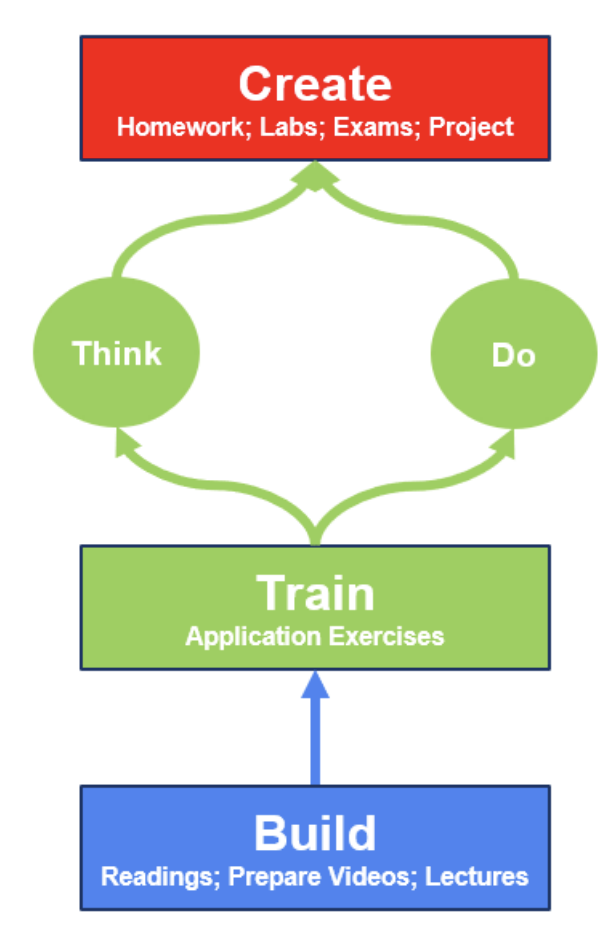
Build: Introduce new content
Train: Put concepts into practice through hands-on class activities
Do: Steps needed to accomplish a task
Think: How to accomplish task in future
Create: Demonstrate learning through a variety of assessments
Source: Meyer and Çetinkaya-Rundel (2025, preprint)
Tidyverse
The tidyverse is an opinionated collection of R packages designed for data science. All packages share an underlying design philosophy, grammar, and data structures.

Tidyverse in data science workflow
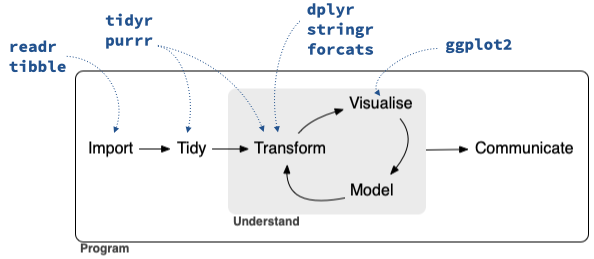
Source: Çetinkaya-Rundel et al. (2022)
Pedagogical benefits of the tidyverse
Consistency: Syntax, function interfaces, argument names and order follow patterns
Mixability: Ability to use base R and other functions within tidyverse syntax
Scalability: Unified approach that works for data sets from a wide range of types and sizes
User-centered design: Function interfaces designed with users in mind
Readability: Interfaces designed to produce readable code
Community: Large, active, and welcoming community of users and resources
Transferability: Data manipulation verbs inherit SQL’s query syntax
Source: Çetinkaya-Rundel et al. (2022)
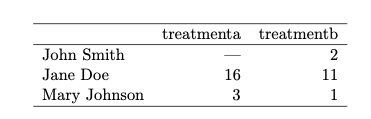
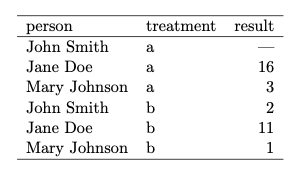
Tidy data
- Each variable forms a column.
- Each observation forms a row.
- Each type of observational unit forms a table.
The pipe
The pipe, |>, is used to pass information from one function to another in the tidyverse.
When reading code aloud in English, say “and then” whenever you see a pipe. Below is a pipeline for a children’s poem.*
Data: Palmer penguins
We will analyze the penguins data set from the palmerpenguins R package maintained by Dr. Allison Horst. This data set contains measurements and other characteristics for penguins observed near Palmer Station in Antarctica. The data were originally collected by Dr. Kristen Gorman.
We will use the following variables:
species: a factor denoting penguin species (Adélie, Chinstrap and Gentoo)flipper_length_mm: an integer denoting flipper length (millimeters)body_mass_g: an integer denoting body mass (grams)
Click here for the full codebook.
penguins data frame
# A tibble: 342 × 8
   species island    bill_length_mm bill_depth_mm flipper_length_mm body_mass_g sex     year
   <fct>   <fct>              <dbl>         <dbl>             <int>       <int> <fct>  <int>
 1 Adelie  Torgersen           39.1          18.7               181        3750 male    2007
 2 Adelie  Torgersen           39.5          17.4               186        3800 female  2007
 3 Adelie  Torgersen           40.3          18                 195        3250 female  2007
 4 Adelie  Torgersen           36.7          19.3               193        3450 female  2007
 5 Adelie  Torgersen           39.3          20.6               190        3650 male    2007
 6 Adelie  Torgersen           38.9          17.8               181        3625 female  2007
 7 Adelie  Torgersen           39.2          19.6               195        4675 male    2007
 8 Adelie  Torgersen           34.1          18.1               193        3475 <NA>    2007
 9 Adelie  Torgersen           42            20.2               190        4250 <NA>    2007
10 Adelie  Torgersen           37.8          17.1               186        3300 <NA>    2007
# ℹ 332 more rows
Base R: Compute summary statistics
Compute the mean flipper length for Palmer penguins.
Base R: Compute summary statistics
For each species, compute the number of penguins and the mean flipper length. Display the results in descending order by number of penguins.
Compute number of penguins by species
Base R: Compute summary statistics
For each species, compute the number of penguins and the mean flipper length. Display the results in descending order by number of penguins.
Combine results and sort data frame
Base R: Full code
num_penguins <- aggregate(flipper_length_mm ~ species, data = penguins, FUN = length)
names(num_penguins)[2] <- "num_penguins"
mean_flipper <- aggregate(flipper_length_mm ~ species, data = penguins, FUN = mean)
names(mean_flipper)[2] <- "mean_flipper_length"
df <- merge(num_penguins, mean_flipper)
df[order(df$num_penguins, decreasing = TRUE), ]
species num_penguins mean_flipper_length
1 Adelie 151 189.9536
3 Gentoo 123 217.1870
2 Chinstrap 68 195.8235Your turn!
Use tidyverse syntax to make the data frame described below:
For each species, compute the number of penguins and the mean flipper length. Display the results in descending order by number of penguins.
Tip
See dplyr reference for list of functions.
Closer look at the code
For each species, compute the number of penguins and the mean flipper length. Display the results in descending order by number of penguins.
# A tibble: 342 × 8
   species island    bill_length_mm bill_depth_mm flipper_length_mm body_mass_g sex     year
   <fct>   <fct>              <dbl>         <dbl>             <int>       <int> <fct>  <int>
 1 Adelie  Torgersen           39.1          18.7               181        3750 male    2007
 2 Adelie  Torgersen           39.5          17.4               186        3800 female  2007
 3 Adelie  Torgersen           40.3          18                 195        3250 female  2007
 4 Adelie  Torgersen           36.7          19.3               193        3450 female  2007
 5 Adelie  Torgersen           39.3          20.6               190        3650 male    2007
 6 Adelie  Torgersen           38.9          17.8               181        3625 female  2007
 7 Adelie  Torgersen           39.2          19.6               195        4675 male    2007
 8 Adelie  Torgersen           34.1          18.1               193        3475 <NA>    2007
 9 Adelie  Torgersen           42            20.2               190        4250 <NA>    2007
10 Adelie  Torgersen           37.8          17.1               186        3300 <NA>    2007
# ℹ 332 more rowsCloser look at the code
For each species, compute the number of penguins and the mean flipper length. Display the results in descending order by number of penguins.
# A tibble: 342 × 8
# Groups:   species [3]
   species island    bill_length_mm bill_depth_mm flipper_length_mm body_mass_g sex     year
   <fct>   <fct>              <dbl>         <dbl>             <int>       <int> <fct>  <int>
 1 Adelie  Torgersen           39.1          18.7               181        3750 male    2007
 2 Adelie  Torgersen           39.5          17.4               186        3800 female  2007
 3 Adelie  Torgersen           40.3          18                 195        3250 female  2007
 4 Adelie  Torgersen           36.7          19.3               193        3450 female  2007
 5 Adelie  Torgersen           39.3          20.6               190        3650 male    2007
 6 Adelie  Torgersen           38.9          17.8               181        3625 female  2007
 7 Adelie  Torgersen           39.2          19.6               195        4675 male    2007
 8 Adelie  Torgersen           34.1          18.1               193        3475 <NA>    2007
 9 Adelie  Torgersen           42            20.2               190        4250 <NA>    2007
10 Adelie  Torgersen           37.8          17.1               186        3300 <NA>    2007
# ℹ 332 more rowsCloser look at the code
Closer look at the code
For each species, compute the number of penguins and the mean flipper length. Display the results in descending order by number of penguins.
Closer look at the code
For each species, compute the number of penguins and the mean flipper length. Display the results in descending order by number of penguins.
Your turn! [Time permitting]
- Create a new data frame that only contains the penguin from each species with the largest body mass.
- Use dplyr functions to continue exploring the
penguinsdata set.
“The tidyverse provides an effective and efficient pathway for undergraduate students at all levels and majors to gain computational skills and thinking needed throughout the data science cycle.”
-Çetinkaya-Rundel et al. (2022)
What about AI?
We recommend minimal use of generative artificial intelligence (AI) for coding when coding proficiency is a learning objective in an introductory course
There are a variety of perspectives on using generative AI tools to teaching coding:
Bien, J., & Mukherjee, G. (2025). Generative AI for Data Science 101: Coding Without Learning To Code. Journal of Statistics and Data Science Education, 33(2), 129-142.
Generative AI in Statistics and Data Science Education (Journal of Statistics and Data Science collection)
Leveraging LLMs for student feedback in introductory data science courses by Mine Çetinkaya-Rundel (USCOTS presentation)
Learning the tidyverse with the help of AI tools by Mine Çetinkaya-Rundel (Tidyverse blog)
Infrastructure
RStudio in the cloud
- Removes the most common hurdle to get started with computing - installation and configuration
- Start using R on Day 1!
- Actively engage students with all aspects of the course, not just in a computing lab
- Install R and RStudio on a server and provide access to students:
- Centralized RStudio Server / Posit Workbench
- Dockerized RStudio Server (what we’re using today)
- Posit Cloud
RStudio in a Docker container
RStudio in Docker containers built and maintained by Duke Office of Information Technology
Customize the pre-installed packages, data sets, etc. for your course
Students access their instance of RStudio using institution credentials
Demo
Open RStudio docker container (see email for URL)
Click File -> New File -> Quarto Document to make a new Quarto document
Parts of a Quarto document:
YAML
Narrative
Code
Use Quarto for reproducible in-class activities and assignments
Discussion
What is something you’ve seen thus far that you find exciting? Want to learn more about? Would like to incorporate in your teaching?
Any other questions/ comments/ discussion points?